Wingdings Translator
Translate English to Wingdings or Wingdings to English instantly, right here in your browser. Supports Wingdings 1, 2, 3, Webdings and Gaster mode — with one-click copy and PNG export. Free, no signup.
Uppercase and lowercase letters map to different symbols — A and a are not the same.
Converted in your browser, nothing is sent to our servers.
Wingdings Translation Examples
Want to see the translator in action? Here are common phrases converted with the classic Wingdings font in text style. Copy any of them with one click.
- Hello☟︎♏︎●︎●︎□︎
- I love you🖐︎ ●︎□︎❖︎♏︎ ⌃︎□︎◆︎
- Wingdings☩︎♓︎■︎♑︎♎︎♓︎■︎♑︎🔸︎
- Good morning☝︎□︎□︎♎︎ ❍︎□︎❒︎■︎♓︎■︎♑︎
- Yes✡︎♏︎🔸︎
What Is Wingdings?
Wingdings is a symbol font ("dingbat" font) that replaces ordinary characters with pictures: type an H and you get a pointing hand, type an S and you get a droplet. It was designed by legendary type designers Charles Bigelow and Kris Holmes, whose Lucida Icons, Arrows and Stars glyph collections were licensed by Microsoft and combined into one font in 1990. Microsoft started shipping Wingdings with Windows 3.1 in 1992, which is how it ended up on hundreds of millions of PCs — and why, decades later, it is still the first font people explore in Microsoft Word (see the Wingdings article on Wikipedia for the full history).
Because Wingdings simply swaps the picture drawn for each key, every Wingdings message is still plain text underneath. The letter H is stored as an H no matter how it is displayed. That is what makes a translator possible: converting English to Wingdings means looking up the Unicode character that matches each key's glyph, and decoding means reversing that lookup. Most Wingdings pictures gained official Unicode code points in Unicode 7.0, which added many symbols originating from the Wingdings and Webdings sets.
Two fun facts most people don't know. First, in 1992 the press famously misread a three-character Wingdings sequence as an offensive message, and Microsoft later added "Webdings" partly as a fresh start. Second, Wingdings became living internet folklore again in 2015–2016, when the character W.D. Gaster in Undertale "spoke" in Wingdings — creating a whole new generation of people who wanted to decode it. Both stories made the font one of the most searched-for "languages" on the internet, even though it isn't a language at all.
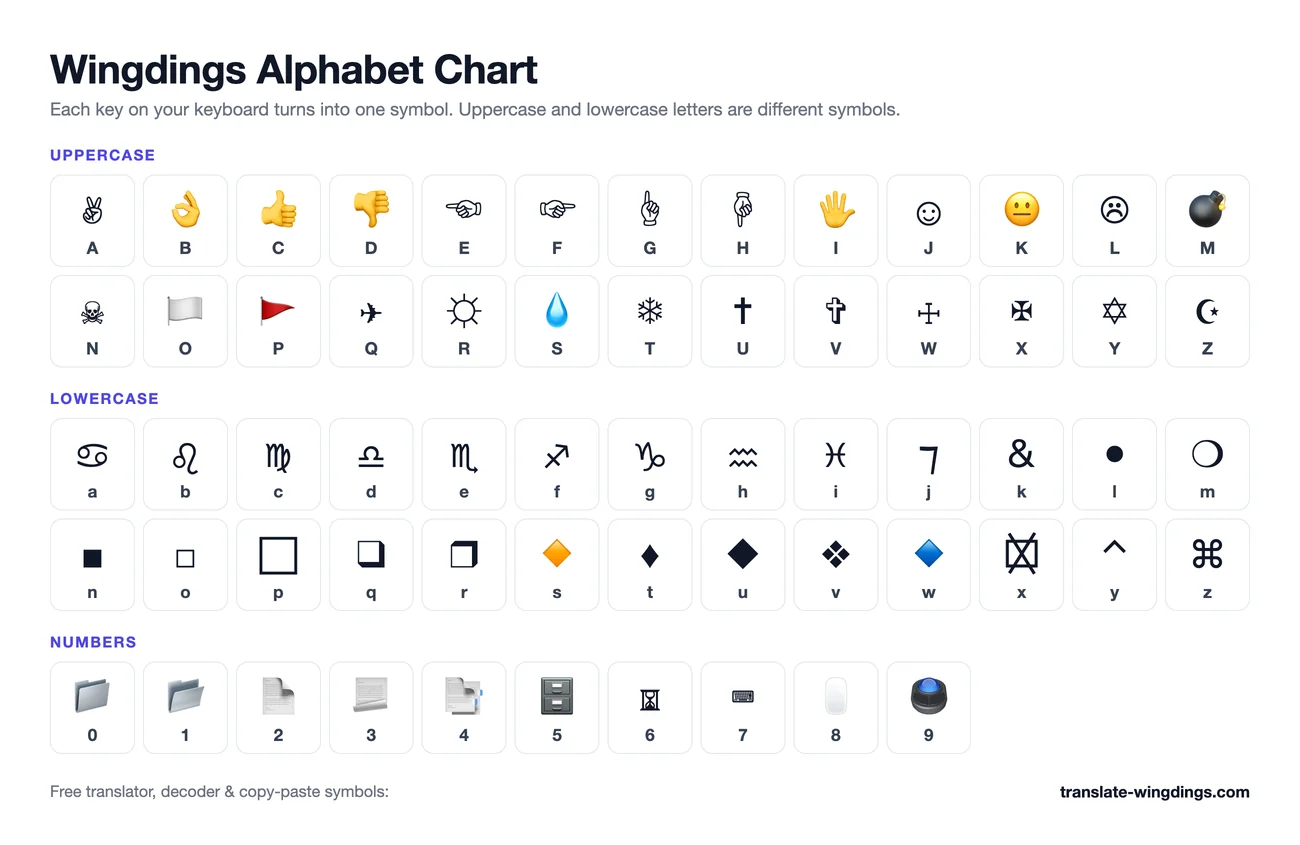
Wingdings Alphabet Chart
In Wingdings, uppercase and lowercase letters are different symbols — A and a are not the same. Here is a quick preview of the first uppercase letters:
✌︎ A | 👌︎ B | 👍︎ C | 👎︎ D | ☜︎ E | ☞︎ F | ☝︎ G | ☟︎ H |
🖐︎ I | ☺︎ J | 😐︎ K | ☹︎ L | 💣︎ M | ☠︎ N | 🏳︎ O |
View the complete Wingdings alphabet chart → — every letter A–Z, a–z, 0–9 and punctuation symbol with one-click copy, print and PNG download.

How to Use the Wingdings Translator
- 1Pick a direction: “English → Wingdings” to encode a message, or “Wingdings → English” to decode one.
- 2Choose your font: Wingdings (classic), Gaster Mode, Wingdings 2, Wingdings 3 or Webdings.
- 3Type or paste your text — the translation updates live as you type, no button needed.
- 4Choose Text style to keep classic black-and-white symbols, or Emoji style where supported.
- 5Hit Copy to grab the result, or Export PNG to save it as an image for TikTok, Instagram or Discord.
English to Wingdings
Converting English to Wingdings turns each character of your message into the symbol that the Wingdings font draws for that key. Type "HELLO" and the H becomes a pointing hand, the E a scorpio glyph, the L a black circle and the O a white square. Because the conversion is character-by-character, numbers, punctuation and even accented letters all work — uppercase and lowercase simply produce different symbols.
The classic use is secret messages: paste the output into a chat or a school note and only people who decode it can read it. The practical use is symbols themselves — the checkmark (ü), the bomb (M) or the mailbox are often faster to copy from a translator than to dig through Word's symbol dialog. Since this tool outputs standard Unicode characters rather than font-dependent text, your translated message keeps its symbols in any app, on any device, even without the Wingdings font installed.
Wingdings to English
Decoding Wingdings to English reverses the process: each symbol is looked up and replaced with the key that produces it. Paste a string of symbols into the translator, flip it to “Wingdings → English”, and the hidden message reads out instantly. Multi-line text is fully supported, so whole paragraphs decode in one go.
Real-world Wingdings text comes in more than one flavor. Some sites emit older Unicode characters (☎ instead of the touch-tone telephone), and text copied while the actual Wingdings font is selected can arrive as private-use code points. This decoder understands all three: the modern Unicode mapping, the common legacy characters, and font-copied private-use text. Anything it doesn't recognize — emojis, other languages, normal words — passes through unchanged, so nothing gets destroyed by accident.
Wingdings Translator for Undertale & Gaster Fans
In Undertale, the royal scientist W.D. Gaster speaks in Wingdings — his name itself stands for "Wing Din gs". Fans have spent years decoding his scattered dialogue from entry number seventeen and the True Lab notes. This translator includes a dedicated Gaster Mode (identical to classic Wingdings) plus a page explaining who Gaster is and which quotes appear in game.
Wingdings 1 vs 2 vs 3 vs Webdings
| Font | Released | What's inside | Best for |
|---|---|---|---|
| Wingdings 1 | 1992, Windows 3.1 | Hands, faces, zodiac, mail, office, weather — the classic mix | Secret messages, Gaster decoding, general use |
| Wingdings 2 | 1992, with Office | Checkmarks, X marks, boxes, clocks, pens | Checklists, forms, yes/no symbols |
| Wingdings 3 | 1992, with Office | Arrows — every direction and style | Diagrams, process flows, pointers |
| Webdings | 1997, Internet Explorer 4 | Web-era pictures: computers, globes, buildings, vehicles | Retro web graphics, richer icon set |
Text Style vs Emoji Style
Several Wingdings symbols — the bomb, the droplet, the skull, the victory hand — now double as emoji in Unicode. Depending on your device, they may suddenly render as colorful emojis instead of the classic black-and-white dingbats, which breaks the look of a secret message.
The translator's Text style appends an invisible character called a variation selector (U+FE0E) after every symbol. This tells the device: "render this as text, not as an emoji". The result keeps the monochrome, old-school Wingdings look in Discord, Word, iMessage and most apps. Emoji style does the opposite: it lets supporting symbols show their colorful emoji forms wherever that looks better. Decoding works in both styles automatically — the selector is stripped before lookup.
Frequently Asked Questions
▸Is Wingdings a real language?
No. Wingdings is not a language — it is a symbol font that Microsoft ships with Windows. When you type the letter H, the font draws a pointing hand instead of the letter. The letter is still an H underneath, which is exactly why a translator can convert it back: each key on your keyboard maps to exactly one symbol.
▸How do I decode Wingdings?
Paste the symbols into the “Wingdings → English” side of the translator above and the English text appears instantly. The tool strips variation selectors, recognizes symbols from other popular translators, and even handles text copied from a real Wingdings font. Unknown characters are left untouched, so mixed text is safe.
▸Can I use Wingdings on Discord, Instagram or TikTok?
Yes, with a trick. Those apps don't have the Wingdings font, so typing in Wingdings there shows plain letters. Instead, use this translator to convert your message into real Unicode symbols, then copy and paste. On Discord and Instagram the symbols display directly; for TikTok videos or Instagram stories, use the “Export PNG” button to save your translation as an image.
▸Why do some symbols show as colorful emojis?
Some Wingdings symbols, like the bomb or the droplet, also exist as emoji in Unicode. Your device may then render a colorful emoji instead of the classic black-and-white glyph. Switch the translator to “Text style” and every symbol gets a U+FE0E variation selector that forces plain text presentation, keeping the classic look in Discord, Word and most apps.
▸How do I type Wingdings in Word?
Type your message in normal letters first, select the text, then change the font to Wingdings in the Home ribbon. That renders the same letters as symbols. If you need symbols you can paste anywhere (not only inside Word), type the message in the translator above and copy the Unicode output instead.
▸What is the difference between Wingdings 1, 2 and 3?
Wingdings (1) is the classic all-purpose mix of hands, faces, zodiac signs, mail and office symbols. Wingdings 2 focuses on checks, crosses, boxes, pens and clocks. Wingdings 3 is almost entirely arrows. Webdings is a related Microsoft font where the same keys give a different set of pictures. All four are supported above — see the comparison table below.
▸What is Gaster Mode?
W.D. Gaster is a mysterious character from the game Undertale whose dialogue appears in the Wingdings font, so fans nicknamed the font “Gaster's language”. Gaster Mode is identical to Wingdings 1 — it exists so fans searching for a Gaster translator land on the right tool. See the Gaster page for in-game quotes decoded.
▸Is this Wingdings translator free?
Yes, completely free with no signup and no limits. Every conversion runs locally in your browser — your text never leaves your device. There is no server-side processing at all.